
Mac & Windows
Word for Mac and Windows.
The Insert Citation pane docks beside your Word window like one of Word's own panes — it follows the window, keeps Word in front and puts the exhibit into the footnote you are writing.
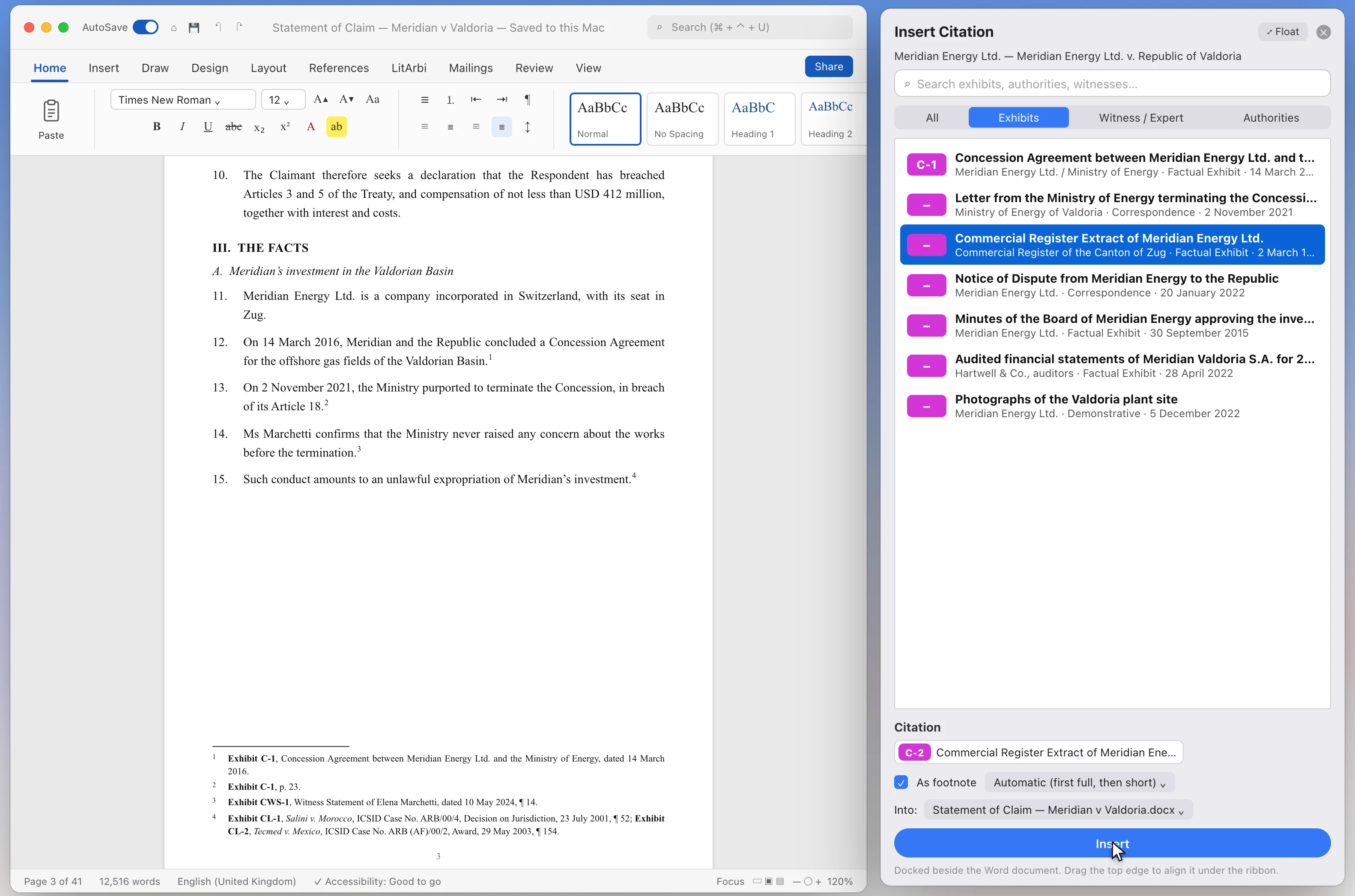

- Search, pick, insert. Type a few letters, click the exhibits, add the paragraphs or pages, insert. Several exhibits become one footnote.
- Correct form, automatically. Exhibit numbers in bold, case names of awards in italics — Salini v. Morocco, ICSID Case No. ARB/00/4, Decision on Jurisdiction, ¶ 123. Ranges read ¶¶ 123–125.
- First full, then short. The first citation of an exhibit in a brief is the full form; every later one is short. Decided per document, so a new brief starts full again.
- A pinpoint every time. Every citation asks for its paragraphs or pages — ¶ first for statements, reports and authorities, the page for documents. Press Return to cite without one.
- Renumber by citation order. Insert an exhibit earlier and Update Exhibits from Brief renumbers every citation and the list of exhibits.
- Live, clickable, editable. Each citation links to its exhibit and survives bundling. Edit & Manage Citations changes or removes them without touching Word by hand; Plain Text turns the fields into fixed text.
- Check before you file. Update Exhibits flags cited exhibits that were moved, merged or deleted, and the same document cited under two numbers — each marked in Word with a short note saying why.
- In Google Docs, too. LitArbi for Google Docs puts the same pane beside Google Docs in the browser — footnotes, full and short forms, the List of Exhibits. More →

LibreOffice Writer
Citing in LibreOffice Writer.
LitArbi for LibreOffice brings LitArbi for Word to Writer. It cites the exhibits of the matter open in LitArbi on the same computer, or of a matter on your firm’s LitArbi Server — in the matter’s own citation style, each citation linked to its exhibit — and numbers them in the order your brief cites them.

- Insert Citation. Search, click the exhibits into the citation, add the page or paragraph. The first citation of an exhibit is the full one, every later one the short form — as a footnote or in the text.
- Your citation style. The matter’s templates from LitArbi, with their bold, italics and underlining, the paragraph sign you chose and date ranges such as “1–5 April 2021”.
- Links that Travel. Each citation links to its exhibit: a click opens it in LitArbi at the cited page, wherever the files have moved.
- Update Exhibits. Numbers the exhibits by their first citation and rewrites every citation with its pinpoint. Numbers on record from an earlier submission, the other side’s numbers and locked numbers stay.
- The List of Exhibits. A table for each kind of document — exhibits, witness statements, legal authorities — in the matter’s language, rebuilt in place after every update.
- Between Writer and Word. The citations carry the same bookmarks as in Word, so a brief saved as .docx moves between LibreOffice and Word and stays up to date.

What you need
- LibreOffice 7 or later on the Mac or on Windows.
- LitArbi 0.9.70 or later on the same computer, with the matter open — or your account on your firm’s LitArbi Server (LitArbi menu ▸ Settings) to cite from its matters; numbering and Update Exhibits need LitArbi on the computer.
- Install it from LitArbi: Settings ▸ Add-ins ▸ Install / Update LibreOffice Add-in (with LibreOffice closed). The LitArbi menu and toolbar then appear in Writer.